How to create
a family archive.
To create a family archive, gather everything in one place, decide what is worth keeping, store the originals in acid-free boxes somewhere cool and dry, digitise the most important items, write down who, what, when and why for each one, keep at least two copies of the digital files, and agree who will look after it next.
That order follows the advice archivists give families, from the Library of Congress’s four steps for keeping digital photos to the US National Archives’ guidance on storing papers and photographs at home. You can do it one box at a time.
A box of papers is not an archive. A box someone can understand is.
What belongs in a family archive?
Anything that records your family’s life and would be hard to replace. It helps to think in five groups:
Photographs, slides and negatives. Prints in albums and envelopes, slides in boxes, negatives in sleeves, and the digital photos on everyone’s phones.
Letters, cards and diaries. The handwriting matters as much as the words, so keep the best originals after scanning.
Certificates and papers. Birth, marriage and death certificates, service records, wills, school reports and work papers.
Recordings. Cassettes, home videos, voicemails and voice notes, plus any interviews you record with relatives.
Objects. Medals, jewellery, a recipe tin, a uniform. You may not keep them all, but photograph each one and write down its story.
How do you decide what to keep?
You will not keep everything, and you do not need to. The New York State Archives suggests asking a few questions of each item, especially when you are sorting the belongings of someone who has died:
Does it capture something unique about the person?
A letter in their handwriting usually does. A folder of gas bills usually does not.
Does it help tell an important family story?
Ask it of groups as well as single items. A year of letters can tell a story no single letter tells.
Are there several similar items?
If so, the archivists suggest you might keep just one or two. Twenty school photos can become the best three.
Do you have the space, now and in a few years?
And is that space safe enough? An item you cannot store well may be better photographed and passed on.
The same archivists add two pieces of advice. Photograph or video a set of items, or a whole room, before you take it apart, whether or not you are keeping the items. And if something has wider historical significance, consider donating it to a historical repository that will preserve it and make it public.
How should you store the originals?
Cool, dry, dark and flat. The US National Archives recommends keeping family papers and photographs below 75°F (about 24°C), and says the lower the temperature, the longer they last. Keep relative humidity below 65% to prevent mould, but not below 15%, which can make them brittle. Keep them out of damp basements, garages and hot attics, away from pipes and windows, and on a shelf rather than the floor. In most British homes that rules out the loft, the cellar and the garage, and points to a cupboard in a room you live in.
Two more points. Newspaper cuttings are highly acidic and yellow quickly, so the New York State Archives suggests keeping them apart from other papers and copying them onto acid-free paper. And the US National Archives warns that colour negatives, slides and prints can fade within decades at room temperature, which makes them a priority for scanning. Our guide to preserving old letters and documents goes further.
What should you digitise first?
Scan what is most at risk and most important first: colour photographs and slides that are fading, cuttings that are yellowing, anything only one relative holds, and anything the family asks about most. A scan protects the content if the original is lost and makes it easy to share, but it does not replace the original. The Library of Congress gives these settings:
Documents and standard prints (6 by 4 inches and 7 by 5 inches): 300 dpi.
Prints you may want to enlarge to 10 by 8 inches or more: 400 or 600 dpi.
Slides: around 1,900 dpi, because they are so much smaller than prints.
Colour photos you may reprint: high-quality JPEG. The New York State Archives prefers uncompressed TIFF master copies, with JPEG copies to share.
Name and file the scans the same way as your digital photos. Our guide to organising family photos sets out a system.
How do you record the stories behind each item?
Give every item a number.
Write it on the folder or envelope that holds the item, and use it in the scan’s file name. The Oral History Society recommends unique numbers for recordings so they can be found later, and the idea works for everything.
Write down who, what, when and why.
Who is in it or who wrote it, what it is, roughly when and where, and why it was kept. A line of each is enough.
Keep an inventory.
A simple list or spreadsheet: number, description, date, people, where the original is and where the scan is. The Library of Congress suggests keeping a copy of your inventory with your important papers.
Record the people who remember.
Ask relatives about the items while you can, and record the answers. For family interviews, the Oral History Society recommends a Joint Statement of Intent covering the purpose, who owns the copyright, any access restrictions and where the recording will be kept, filled in by both of you afterwards and kept with the recording.
Our guide to recording family stories will help with the conversations.
Who looks after the archive next?
Agree a keeper while everyone can still talk about it. One person should hold the original boxes, because papers split between three houses stop being a set. Write down who the keeper is, where the boxes are and where the digital copies live, and keep that note with the inventory.
Digital copies are what let the whole family share the archive. Keep them under the 3-2-1 rule that US-CERT recommends for any important file: three copies, on two types of storage, one of them off-site. Our guide to backing up family photos explains how, and it applies to scans and recordings too.
For recordings kept in the family, the Oral History Society says you have a duty to store and back up the files, keep the signed statement with them and honour any access restrictions the speaker asked for. If the family cannot agree on what to keep, the New York State Archives suggests getting help to build agreement first.
How it helps.
Boxes of originals need one keeper, but the digital side of an archive can belong to everyone. Ancestorii gives your family one private space for it. Scans go into a shared Library of folders, each with a name, description and date. Each person can have a Loved One profile with their dates and life story; the Free plan covers one loved one, and Premium, at £3.99 a month per family, covers as many as you need. Timelines put dated events in order, albums hold photos with their stories and voice notes, and capsules keep letters and photos sealed until a date you choose.
Everyone you invite sees the same archive and can add to it, and only the person who added something can delete it, so the archive does not depend on one person’s laptop. It does not replace the boxes or your own backups; it is the part the family actually opens. Read more about what a living family library is.
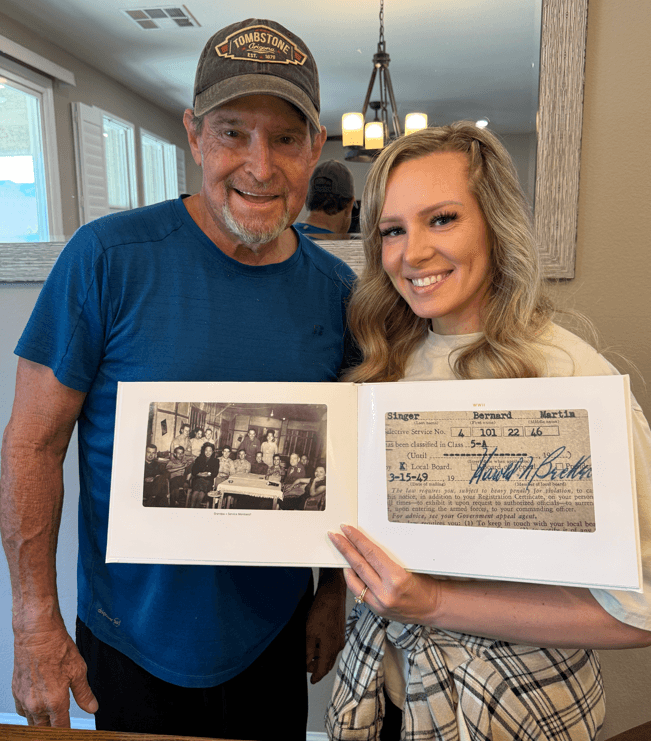
Some families also print the best of it. Below, Alison and her dad hold his printed Memory Book, open at an old family photograph and a 1949 draft card. Memory Books start at £44.99 plus delivery.
Frequently asked questions.
What should go in a family archive?
How do I store a family archive at home?
Should I digitise everything?
Who should look after the family archive?
Can I donate family papers to an archive?
Sources
- Library of Congress · Digital Photos: Personal Archiving (accessed October 2026)
- Library of Congress · Scanning Your Personal Collections (Personal Digital Archiving series) (accessed October 2026)
- US National Archives · How to Preserve Family Archives: Storing Family Papers and Photographs (2025)
- Image Permanence Institute, RIT · Photographic Activity Test (accessed October 2026)
- New York State Archives · What to Save (accessed October 2026)
- New York State Archives · Paper (accessed October 2026)
- New York State Archives · Digital Media (accessed October 2026)
- Oral History Society · Oral history and family history (accessed October 2026)
- Oral History Society · Advice about equipment (accessed October 2026)
- US-CERT (now CISA) · Data Backup Options (2012)